
Real Examples & Results


Remove Image Backgrounds in One Workflow
Automatic Subject Detection
Let AI separate the subject from the background without manually tracing its outline.
Transparent Backgrounds
Remove the original backdrop to prepare a transparent-background image for layouts and compositing.
Versatile Subjects
Use a clear subject photo to prepare background-free portraits, pet images, and product visuals.
Common Image Formats
Start with JPG, PNG, or WebP images without converting them to a special format.
Before-and-After Comparison
Compare the result with the original to inspect the subject’s outline and the details you want to retain.
Download & Further Editing
Save the background-free result or continue working with image tools for the next design step.
How It Works - 3 Simple Steps
Upload Your Image
Simply drag and drop or click to upload any image format. Our AI supports JPG, PNG, WebP and more.
AI Processing
Our advanced AI automatically detects the subject and removes the background with pixel-perfect precision.
Download Result
Get your high-quality image with transparent background in seconds. Perfect for any project or design.
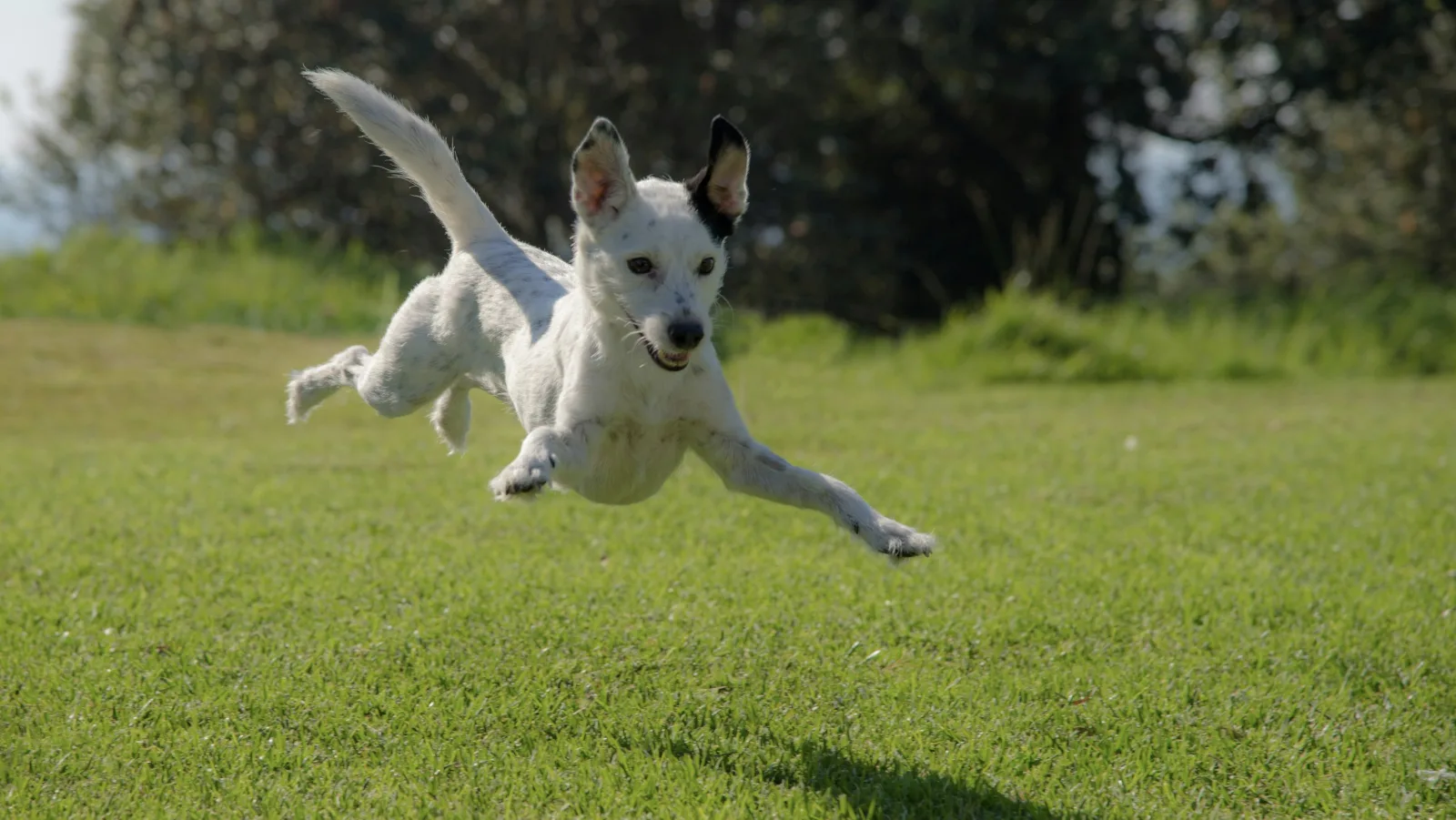
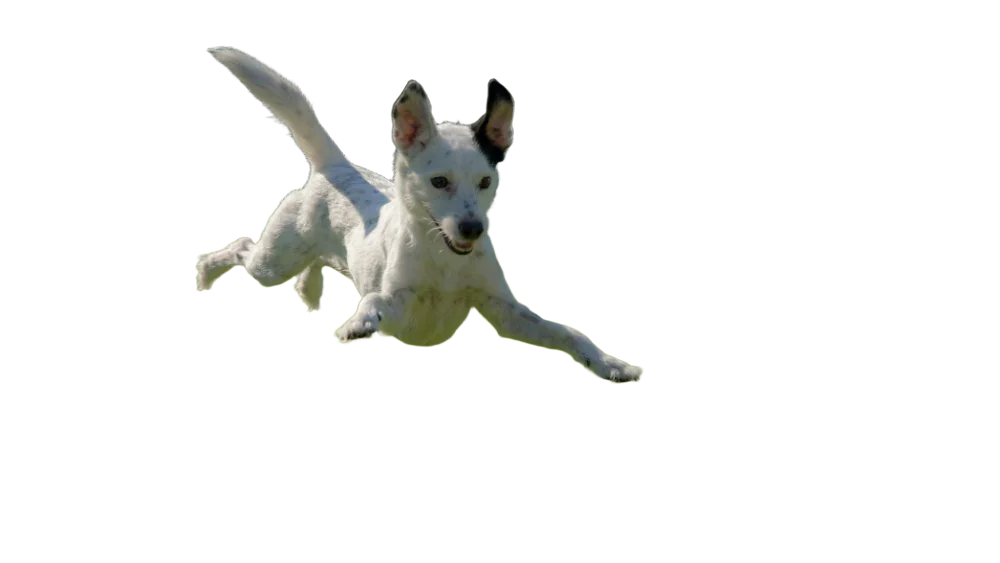
Fast processing • HD output • Transparent PNG
Choose Your Plan
Free images include a watermark. Upgrade for clean outputs, faster generation, and commercial use.
Pro
-50%Unlimited Model Benefits
 Seedream 3.5Unlimited
- Seedream 3.5 ProUnlimited Not Included
 MiniMax H3 TurboUnlimited Not Included
- MiniMax H3Unlimited Not Included
- Upgrade to unlock all advanced models and enjoy exclusive discountsMiniMax-70%
 Gemini
 Nano
 GPT-50%Seedream-40%Veo
 Seedance
 Kling
 Grok
 Wan
- 2,000 credits per month
- Up to 2,000 fast images
- Up to 200 basic videos
- Priority queue
- No watermarks
- Batch processing with AI tools
- Full privacy
Ultimate
-50%Unlimited Model Benefits
- Seedream 3.5Unlimited
- Seedream 3.5 ProUnlimited
- MiniMax H3 TurboUnlimited Not Included
- MiniMax H3Unlimited Not Included
- Upgrade to unlock all advanced models and enjoy exclusive discountsMiniMax-70%GeminiNanoGPT-50%Seedream-40%VeoSeedanceKlingGrokWan
- 5,000 credits per month
- Up to 5,000 fast images
- Up to 500 basic videos
- Highest priority queue
- No watermarks
- Batch processing with AI tools
- Full privacy
Max
-50%Unlimited Model Benefits
- Seedream 3.5Unlimited
- Seedream 3.5 ProUnlimited
- MiniMax H3 TurboUnlimited
- MiniMax H3Unlimited
- Upgrade to unlock all advanced models and enjoy exclusive discountsMiniMax-70%GeminiNanoGPT-50%Seedream-40%VeoSeedanceKlingGrokWan
- 10,000 credits per month
- Up to 10,000 fast images
- Up to 1,000 basic videos
- Highest priority queue
- No watermarks
- Batch processing with AI tools
- Full privacy
Frequently Asked Questions about Raphael AI Background Remover
Everything you need to know about using Raphael AI to remove backgrounds from your images
How does Raphael AI's Background Remover work?
Raphael AI Background Remover uses advanced machine learning algorithms to automatically detect and remove backgrounds from your images. Simply upload your image and Raphael AI will process it in seconds, delivering a clean cutout with transparent background. Our AI technology ensures pixel-perfect background removal every time.
What types of images work best with our AI background removal tool?
Raphael AI's background remover works excellently with people, products, animals, cars and graphics. It handles complex edges like hair, fur and transparent objects with remarkable accuracy. For best results when you remove background, use images with clear subjects and good contrast between the subject and background.
What file formats does Raphael AI Background Remover support?
Raphael AI supports all major image formats including JPG, PNG, WebP and BMP for background removal. After we remove background from your image, the output is provided as a high-quality PNG with transparent background, perfect for any design or e-commerce needs.
Can I try Raphael AI's Background Remover online?
Yes. Upload an image, let Raphael AI remove the background automatically, then download a clean transparent PNG for your workflow.
How fast can Raphael AI remove backgrounds from images?
Raphael AI's background remover processes most images within 5 seconds. Our AI technology can quickly remove background from any image, with the exact time depending on image size and complexity. Pro and Ultimate users get priority processing for even faster background removal results.
Can I use images from Raphael AI Background Remover commercially?
Absolutely! All images processed through Raphael AI's background remover are yours to use for any purpose, including commercial projects. There are no licensing restrictions on images after we remove background for you.
Which use cases is Raphael AI Background Remover perfect for?
Raphael AI excels at background removal for e-commerce product photos, social media profile pictures, marketing materials, ID photos and creative designs. Whether you need to remove background for Amazon listings, Instagram posts or professional presentations, our AI background remover delivers perfect results every time.
Does Raphael AI store my images after background removal?
No, Raphael AI prioritizes your privacy. We don't store any images after we remove background from them. All uploaded images and processed results are immediately deleted from our servers after you download them. Your data remains completely private when using our background remover.
How does Raphael AI's background removal compare to manual editing?
Unlike manual editing in Photoshop which can take 5-30 minutes per image, Raphael AI's background remover works in just 5 seconds. Our AI technology can remove background with the same precision as manual editing but 100x faster. Perfect for anyone who needs to remove backgrounds from multiple images quickly.
Can I remove backgrounds from product photos for my online store?
Yes! Raphael AI Background Remover is perfect for e-commerce. You can easily remove background from product photos to create clean white backgrounds or transparent PNGs for your online store. Our AI ensures professional results that meet marketplace requirements like Amazon, eBay and Shopify.
What if the AI doesn't perfectly remove the background on first try?
If Raphael AI's background remover doesn't achieve perfect results on the first attempt, we recommend re-uploading the image with better lighting or contrast. Our AI continuously learns and improves its ability to remove backgrounds. For complex images, try adjusting the image quality before uploading to our background remover.
Will Raphael AI Background Remover support batch processing in the future?
Yes! We're actively developing batch processing capabilities for Raphael AI, allowing you to remove backgrounds from multiple images simultaneously. We're also working on an API for developers who want to integrate our background removal technology. Stay tuned for these exciting updates to Raphael AI's background remover!